Building automation systems help commercial properties manage heating, ventilation and air conditioning (HVAC), lighting, access control, energy consumption, alarms, and other building services through coordinated control. When these systems work together correctly, facility managers can improve operational efficiency, occupant comfort, maintenance planning, and energy performance.
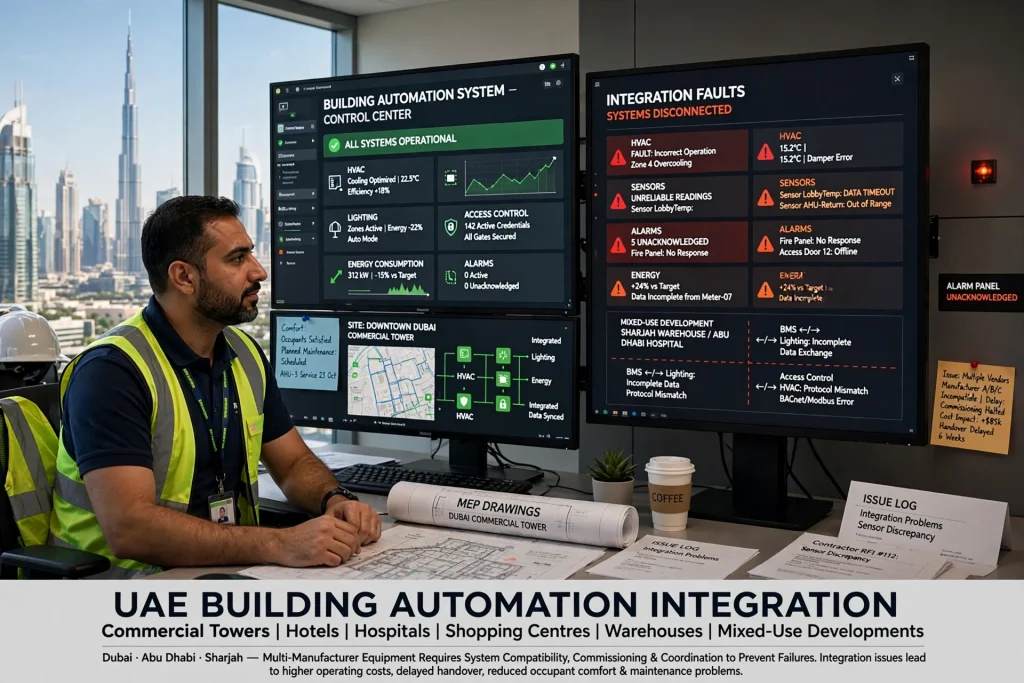
However, building automation projects do not always deliver the expected results. Integration problems can cause HVAC equipment to operate incorrectly, sensors to provide unreliable readings, alarms to go unnoticed, and different systems to exchange incomplete or inaccurate information. These issues can increase operating costs and delay project handover.
In the UAE, building automation integration is particularly important for commercial towers, hotels, hospitals, shopping centres, warehouses, and mixed-use developments. Buildings in Dubai, Abu Dhabi, and Sharjah often contain equipment from multiple manufacturers, making system compatibility, commissioning, and coordination essential.
Understanding why building automation projects fail during integration helps developers, MEP consultants, system integrators, contractors, and facility managers prevent problems before they affect building operations.
What Is Building Automation System Integration?
Building automation system integration is the process of connecting different building services so they can exchange information and operate according to coordinated control strategies. A building management system (BMS) or building automation system (BAS) may monitor and control HVAC equipment, lighting, meters, pumps, ventilation systems, and other mechanical and electrical services.
For example, a commercial office in Business Bay may use a BMS to monitor chilled water temperatures, control air handling units (AHUs), receive alarms from pumps, and display energy consumption. A properly integrated system allows operators to view relevant information centrally and coordinate equipment according to schedules, operating conditions, and occupancy.
Integration does not necessarily mean that every device is connected to one network or controlled by a single platform. Some systems communicate directly, while others exchange information through gateways, application programming interfaces (APIs), or supervisory controllers.
The objective is to ensure that connected systems communicate accurately, perform their intended functions, and remain maintainable throughout the building’s operational life.
1. Incompatible Communication Protocols
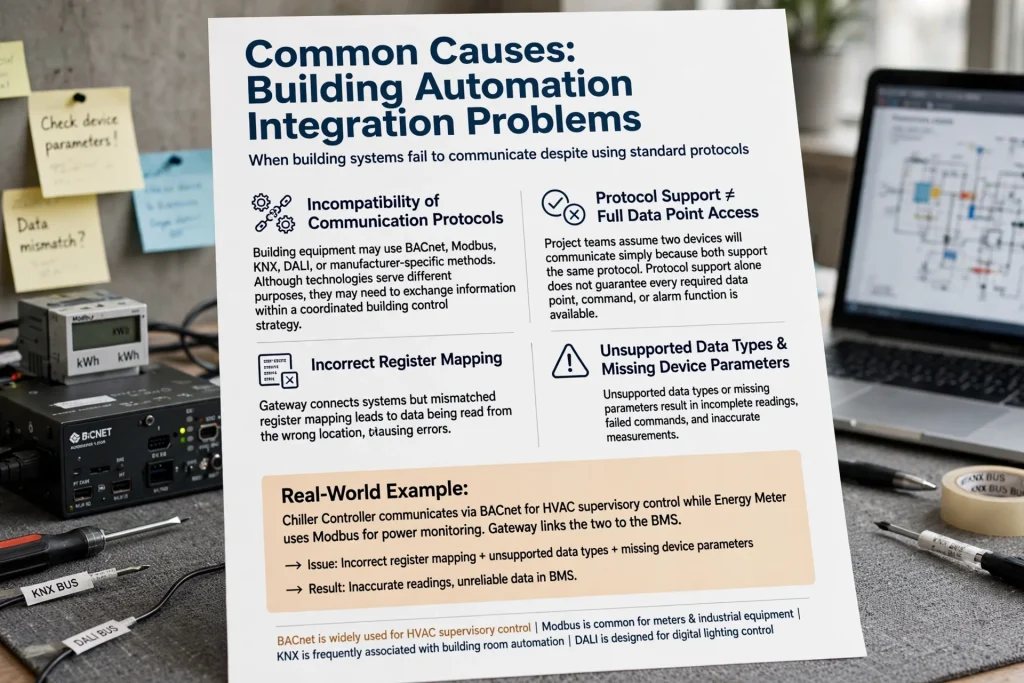
One of the most common causes of building automation integration problems is incompatibility between communication protocols. Building equipment may use BACnet, Modbus, KNX, DALI, or manufacturer-specific communication methods. Although these technologies serve different purposes, they may need to exchange information within a coordinated building control strategy.
BACnet is widely used for building automation communication, particularly for HVAC and supervisory control. Modbus is commonly used with meters, controllers, and industrial equipment. KNX is frequently associated with building and room automation, while DALI is designed for digital lighting control.
Problems arise when project teams assume that two devices will communicate simply because both support a recognised protocol. Protocol support alone does not guarantee that every required data point, command, alarm, or function is available.
For example, a chiller controller may communicate through BACnet, while an energy meter uses Modbus. A gateway might connect the two systems to the BMS, but incorrect register mapping, unsupported data types, or missing device parameters can result in inaccurate readings.
How to Prevent Protocol Compatibility Problems
Identify the communication requirements of every major system before equipment procurement. Prepare an integration matrix that lists each device, its protocol, available data points, required commands, communication settings, and responsible supplier.
Confirm whether the proposed integration requires a gateway, protocol converter, licence, or additional controller. Request written confirmation from the equipment manufacturer or authorised system integrator, and test critical communication functions before full installation.
2. Poor Planning During the Design Stage
Some integration failures begin before installation. When building automation requirements are not clearly defined during design, contractors may select incompatible equipment, omit necessary interfaces, or underestimate the work required to connect systems.
A project specification may state that the BMS must monitor HVAC equipment without identifying the exact status points, operating commands, alarm conditions, or control sequences required. This creates uncertainty between the MEP consultant, controls contractor, equipment supplier, and commissioning team.
For example, a project in Dubai South may require monitoring of air handling units, exhaust fans, chilled water pumps, and energy meters. If the design does not define which readings and alarms must be available at the BMS workstation, the final system may provide only basic monitoring instead of the expected operational functionality.
How to Prevent Design-Stage Failures
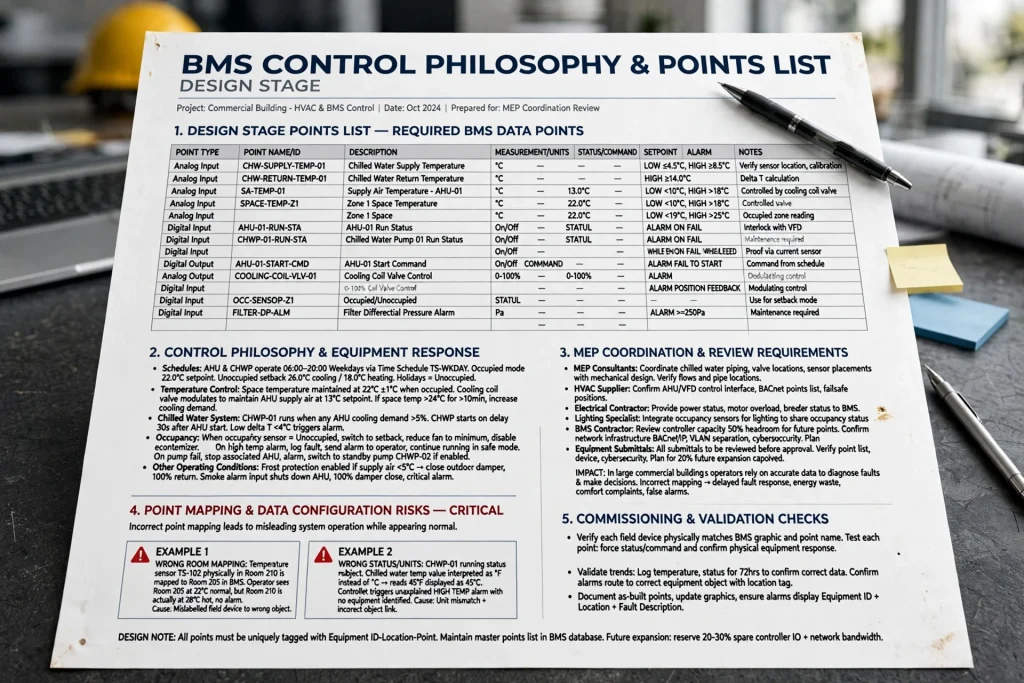
Prepare a detailed BMS points list and control philosophy during the design stage. The points list should identify each required measurement, status, command, setpoint, and alarm. The control philosophy should explain how equipment responds to schedules, temperature readings, occupancy, faults, and other operating conditions.
MEP consultants should coordinate these requirements with HVAC suppliers, electrical contractors, lighting specialists, and the BMS contractor. Review the design for interface requirements, network infrastructure, controller capacity, and future expansion before approving equipment submittals.
3. Incorrect Point Mapping and Data Configuration
Point mapping connects information from field devices to the correct objects, graphics, trends, and control functions within the building automation platform. Incorrect mapping can make a system appear operational while displaying misleading information.
For example, a temperature sensor may be mapped to the wrong room, a pump’s running status may appear under another equipment name, or a chilled water temperature value may be interpreted using the wrong units. A controller may also display an alarm without identifying the equipment that caused it.
These errors are especially problematic in large commercial buildings because operators depend on accurate data to diagnose faults and make decisions.
How to Prevent Point-Mapping Errors
Use a standard naming convention for equipment, floors, rooms, systems, and data points. Match the BMS software configuration to the approved equipment schedules and points list.
During commissioning, verify each important point against the actual field device. Check sensor readings, equipment status, alarm conditions, commands, and engineering units. Test both the field equipment and the corresponding BMS display rather than relying on software configuration alone.
A structured point-to-point testing record helps identify errors and provides evidence that the integration meets the project’s requirements.
4. Incorrect Control Sequences
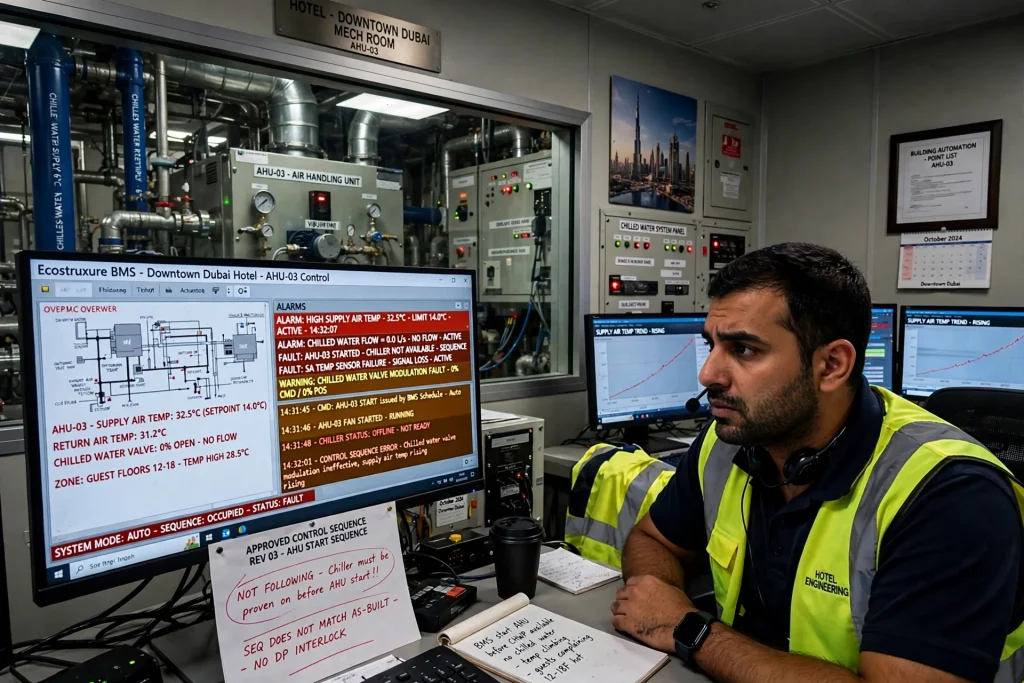
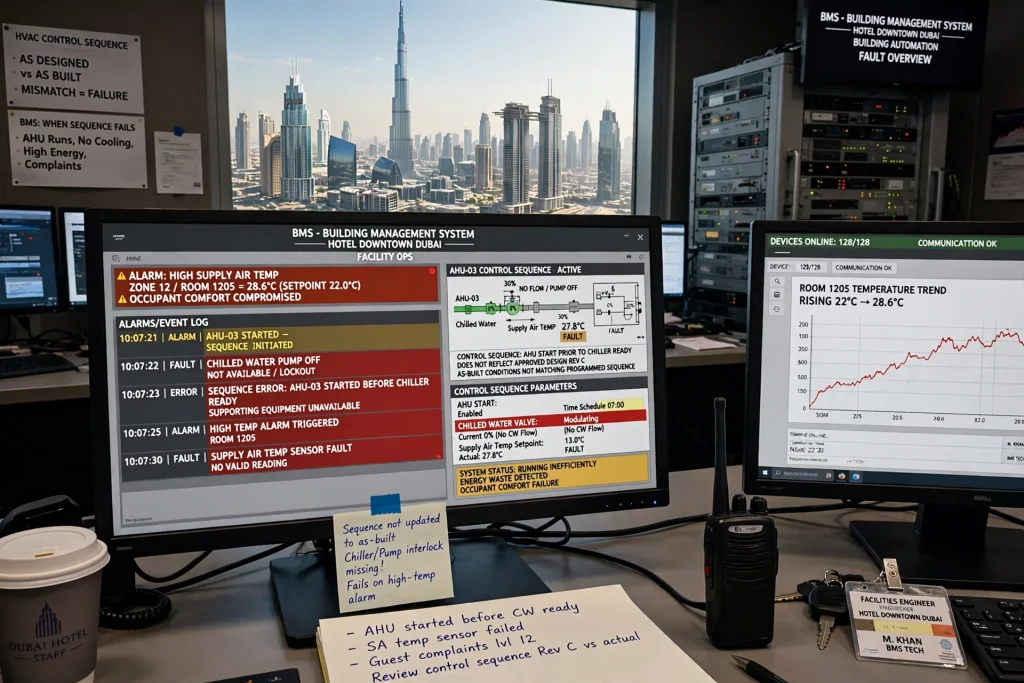
A building automation system can communicate with all the required devices and still fail to operate the building correctly. This often happens when the programmed control sequences do not reflect the approved design or real operating conditions.
A control sequence defines how equipment should respond to measurements, schedules, alarms, and commands. For HVAC systems, it may specify when an AHU starts, how a chilled water valve modulates, how supply air temperature is maintained, and what happens when a sensor fails.
Consider a hotel in Downtown Dubai. If the BMS starts an AHU before the required supporting equipment is available, or fails to respond correctly to a high-temperature alarm, the system may operate inefficiently or compromise occupant comfort.
How to Prevent Control-Sequence Failures
Develop and approve the control sequences before programming begins. Involve the MEP consultant, controls specialist, equipment manufacturer, and facility management representative to confirm how the system should behave under normal, abnormal, and emergency conditions.
Test the sequences using functional performance testing. Simulate sensor failures, communication loss, equipment faults, schedule changes, and relevant alarm conditions where safe and appropriate.
For complex HVAC systems, verify the sequence under realistic operating conditions rather than testing only whether a command appears on the BMS screen.
5. Network Infrastructure and Communication Problems
Building automation depends on reliable communication between field controllers, supervisory controllers, servers, gateways, and operator workstations. Poor network planning can lead to intermittent communication, slow graphics, delayed alarms, or devices repeatedly disconnecting.
Potential causes include incorrect IP addressing, duplicate addresses, unsuitable network segmentation, poor cable termination, inadequate switch capacity, excessive network traffic, and weak coordination between IT and controls contractors.
Large properties may also have several floors, plant rooms, service buildings, and remote equipment areas. If the network architecture does not account for these locations, troubleshooting can become difficult.
How to Prevent Network Failures
Prepare a documented network architecture showing controllers, gateways, switches, servers, IP addresses, communication links, and network boundaries. Coordinate with the building’s IT team to define access permissions, cybersecurity requirements, remote access, and network responsibilities.
Test communication quality during commissioning and investigate repeated timeouts, packet loss, and offline devices. Use suitable network equipment and follow the applicable communication standards and manufacturer recommendations.
Document the final network configuration and keep approved backups of controller programs, server settings, and relevant configuration files.
6. Inadequate Sensor Selection and Installation
Sensors are essential to building automation because control decisions depend on the accuracy of their readings. Poor sensor placement, incorrect calibration, unsuitable measurement ranges, and environmental interference can cause incorrect system responses.
A room temperature sensor positioned near a supply air grille may report a temperature that does not represent the occupied area. Similarly, a poorly located CO₂ sensor may provide readings that do not accurately reflect the ventilation needs of the space.
In UAE buildings, sensor selection also requires attention to operating temperatures, dust, humidity, and the conditions in ceiling voids, plant rooms, and exposed areas.
How to Prevent Sensor-Related Failures
Select sensors based on the measurement requirements, environmental conditions, and equipment specifications. Confirm suitable accuracy, range, mounting location, and communication interface before installation.
Check sensor placement against the mechanical design and manufacturer’s instructions. During commissioning, compare critical readings with an appropriate reference instrument and investigate differences beyond the specified tolerance.
Where a sensor provides an essential control input, define the expected system response if the sensor becomes disconnected, produces an implausible reading, or stops communicating.
7. Insufficient Coordination Between Contractors
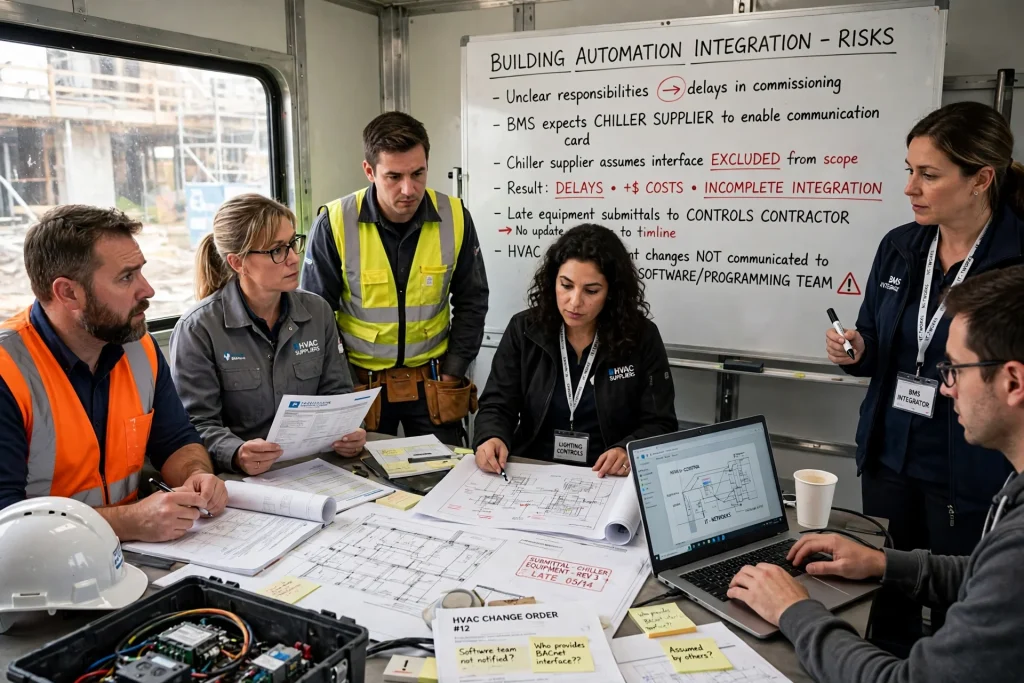
Building automation integration involves several parties, including MEP contractors, HVAC suppliers, electrical contractors, lighting-control specialists, IT teams, and BMS integrators. Problems occur when responsibilities are unclear or each contractor assumes another party will provide a required interface.
For example, the BMS contractor may expect a chiller supplier to enable a communication card, while the chiller supplier assumes that the interface is excluded from its scope. The result can be a delay during commissioning, additional costs, and incomplete integration.
Similar issues arise when the controls contractor receives late equipment submittals or when changes to HVAC equipment are not communicated to the software programming team.
How to Prevent Coordination Problems
Assign clear responsibilities for each interface in the project scope. Identify who supplies communication hardware, installs control wiring, configures equipment, provides software licences, tests data points, and approves functional performance.
Maintain a coordinated integration schedule and arrange regular technical meetings with the relevant contractors. Review changes to equipment models, firmware, control sequences, and network requirements before they affect installation or commissioning.
A single integration register should track outstanding interfaces, technical queries, dependencies, responsible parties, and target completion dates.
8. Poor Commissioning and Incomplete Testing
Commissioning is one of the most important stages of a building automation project. When testing is rushed or limited to basic communication checks, hidden integration defects may remain undiscovered until the building is occupied.
Seeing an AHU online in the BMS does not prove that the system controls it correctly. The operator may still encounter incorrect temperature readings, failed schedules, ineffective alarms, or commands that do not reach the intended equipment.
How to Prevent Commissioning Failures
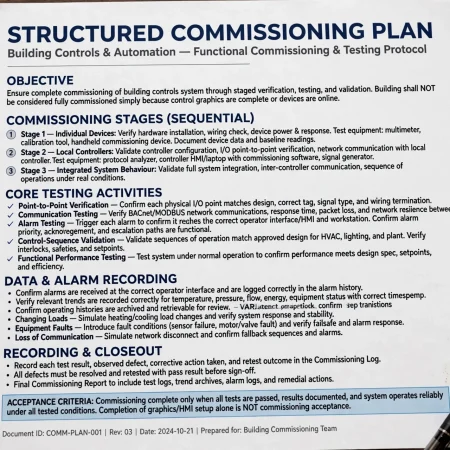
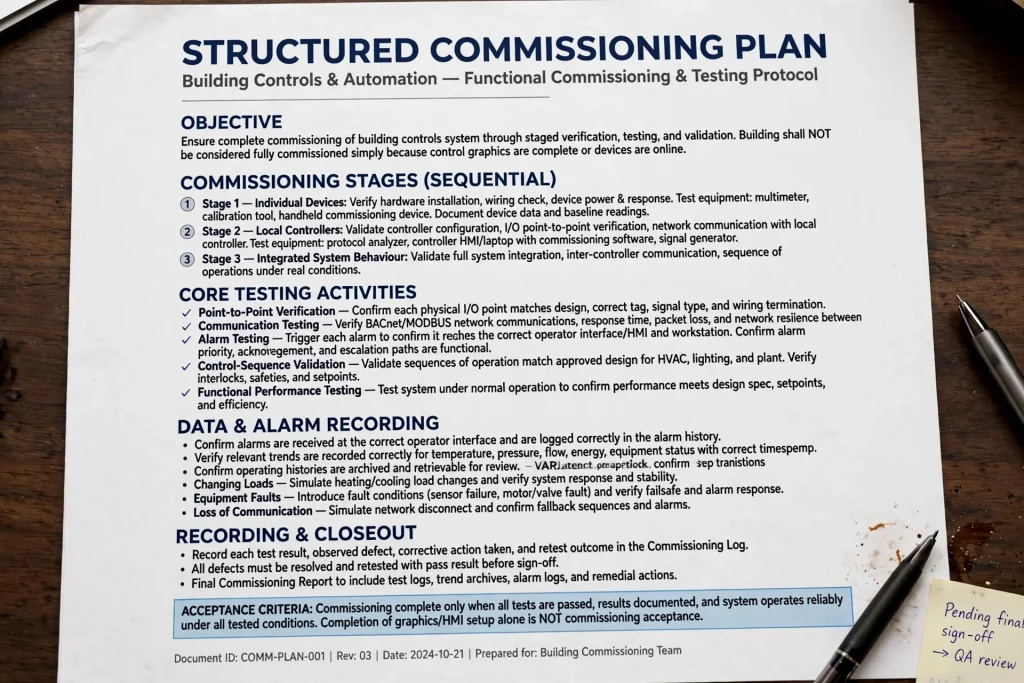
Use a structured commissioning plan that covers point-to-point verification, communication testing, alarm testing, control-sequence validation, and functional performance testing.
Test equipment in stages, beginning with individual devices and local controllers before moving to integrated system behaviour. Confirm that alarms reach the correct operator interface and that relevant trends and operating histories are recorded correctly.
Where possible, perform integrated testing under different operating conditions, including occupied and unoccupied schedules, changing loads, equipment faults, and loss of communication. Record each test result, defect, corrective action, and retest outcome.
The building should not be considered fully commissioned simply because the control graphics are complete or the devices are online.
9. Cybersecurity and Uncontrolled Remote Access
Building automation systems increasingly use connected networks, remote monitoring, and software-based management. These capabilities can improve operational visibility, but they also introduce cybersecurity risks when access is poorly controlled.
Common weaknesses include shared administrator accounts, default passwords, unnecessary open network ports, outdated firmware, unsecured remote access, and a lack of separation between building controls and corporate IT networks.
A cybersecurity incident may affect the availability, integrity, or confidentiality of building automation services.
How to Prevent Cybersecurity Problems
Establish cybersecurity requirements during design rather than waiting until handover. Use unique user accounts, role-based access permissions, strong authentication where supported, controlled remote access, and appropriate network segmentation.
Maintain an inventory of controllers, servers, gateways, and software versions. Apply security updates through a controlled process after checking compatibility with operational requirements. Keep tested configuration backups and document how the system can be recovered after a failure.
Coordinate with the building owner’s IT and cybersecurity teams to establish monitoring, incident response, access approval, and maintenance procedures.
10. Missing Documentation and Poor Handover
A building automation system may work correctly at handover but become difficult to maintain if the facility team does not receive complete documentation. Missing information can increase troubleshooting time, complicate future modifications, and create unnecessary dependence on the original contractor.
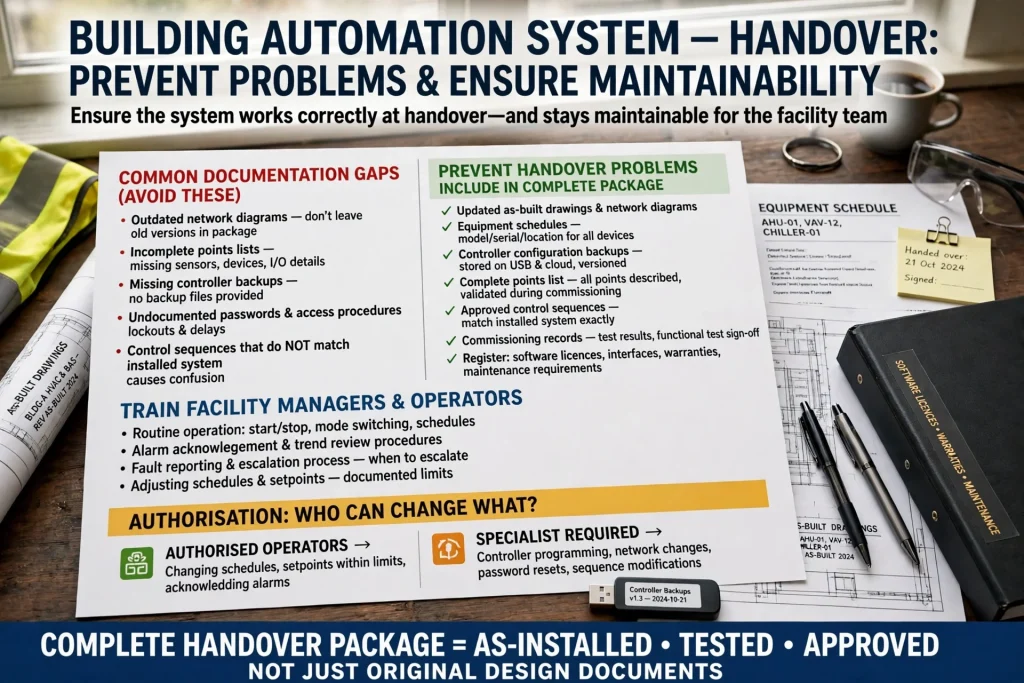
Common documentation gaps include outdated network diagrams, incomplete points lists, missing controller backups, undocumented passwords or access procedures, and control sequences that do not match the installed system.
How to Prevent Handover Problems
Provide updated as-built drawings, network diagrams, equipment schedules, controller configuration backups, points lists, approved control sequences, and commissioning records. Include a clear register of software licences, interfaces, warranties, and maintenance requirements.
Train facility managers and operators on routine operation, alarm acknowledgement, schedule adjustment, trend review, fault reporting, and escalation procedures. Explain which settings can be changed by authorised operators and which require specialist intervention.
A complete handover package should reflect the system as installed, tested, and approved—not simply reproduce the original design documents.
11. Failure to Consider Energy Performance and Operational Needs
Some building automation projects focus heavily on installation and connectivity while paying insufficient attention to how the system will perform during everyday operation. A BMS may display hundreds of data points without helping operators identify waste, recurring faults, or opportunities to improve comfort.
For example, an AHU may continue running outside required operating hours, chilled water valves may remain open unnecessarily, or temperature setpoints may conflict between different control zones.
How to Prevent Operational Performance Problems
Define measurable operational objectives before implementation. These might include operating-hour compliance, temperature stability, ventilation performance, alarm response, equipment availability, and energy consumption.
Use trend logs and energy meter data to identify unusual patterns. Review schedules, setpoints, sensor performance, and control sequences after the building reaches normal occupancy.
Energy-saving functions should be tested and adjusted to suit the building’s actual use. Avoid aggressive schedules or setpoints that create discomfort, ventilation problems, or excessive equipment cycling.
Building automation should support safe, reliable operation first, with energy optimization designed around the building’s needs and applicable requirements.
Building Automation Integration Challenges in the UAE
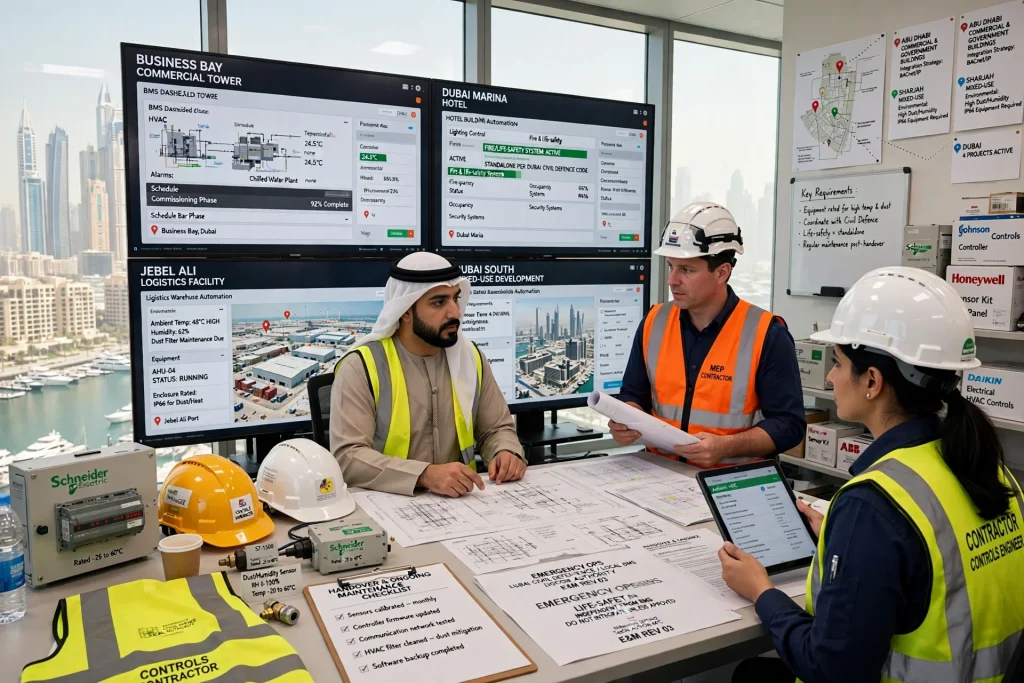
Building automation projects across Dubai, Abu Dhabi, and Sharjah can involve demanding schedules, multiple specialist contractors, diverse equipment brands, and complex operational requirements. Commercial towers in Business Bay, hotels in Dubai Marina, logistics facilities in Jebel Ali, and mixed-use developments in Dubai South may all require different integration strategies.
Environmental conditions also matter. High outdoor temperatures can affect equipment installed in exposed or poorly ventilated locations, while dust and humidity can influence the suitability and maintenance requirements of certain devices. Equipment should be selected and installed according to its rated operating conditions.
Project teams should also coordinate building automation with local authority requirements, approved electrical and mechanical designs, fire and life-safety systems, and emergency operating procedures. Critical life-safety functions must follow their applicable design and regulatory requirements; they should not depend on an ordinary BMS control sequence unless specifically permitted and designed for that purpose.
After handover, ongoing maintenance is essential to keep sensors, controllers, communication networks, HVAC equipment, and software operating correctly. Property owners can arrange professional building managament service in dubai to help maintain building systems and address operational issues. Replace this link with the dedicated building maintenance service page if a more specific URL is available.
A Practical Checklist for Successful Building Automation Integration
Before installation, confirm the integration scope, approved equipment models, communication protocols, points list, network architecture, control sequences, and interface responsibilities. Resolve compatibility questions before procurement wherever possible.
During installation, verify control wiring, device addressing, sensor locations, controller configuration, and network connections. Keep an updated record of any approved design changes.
During commissioning, complete point-to-point tests, communication checks, alarm verification, control-sequence testing, and integrated functional performance tests. Record defects and confirm that corrective actions have been retested successfully.
Before handover, provide as-built documentation, software and configuration backups, approved access procedures, commissioning reports, and operator training. Confirm that the facility team understands the system’s normal operation and the procedure for reporting faults.
After occupancy, review alarms, trends, energy performance, and user feedback. Adjust schedules and control parameters where evidence shows that the building is not operating as intended.
Frequently Asked Questions
Why do building automation projects fail during integration?
Common causes include incompatible communication interfaces, unclear design requirements, incorrect point mapping, poorly programmed control sequences, network issues, inadequate contractor coordination, incomplete commissioning, and missing handover documentation. Many of these problems can be reduced through early planning, clear responsibilities, and structured testing.
What is the difference between a BMS and a BAS?
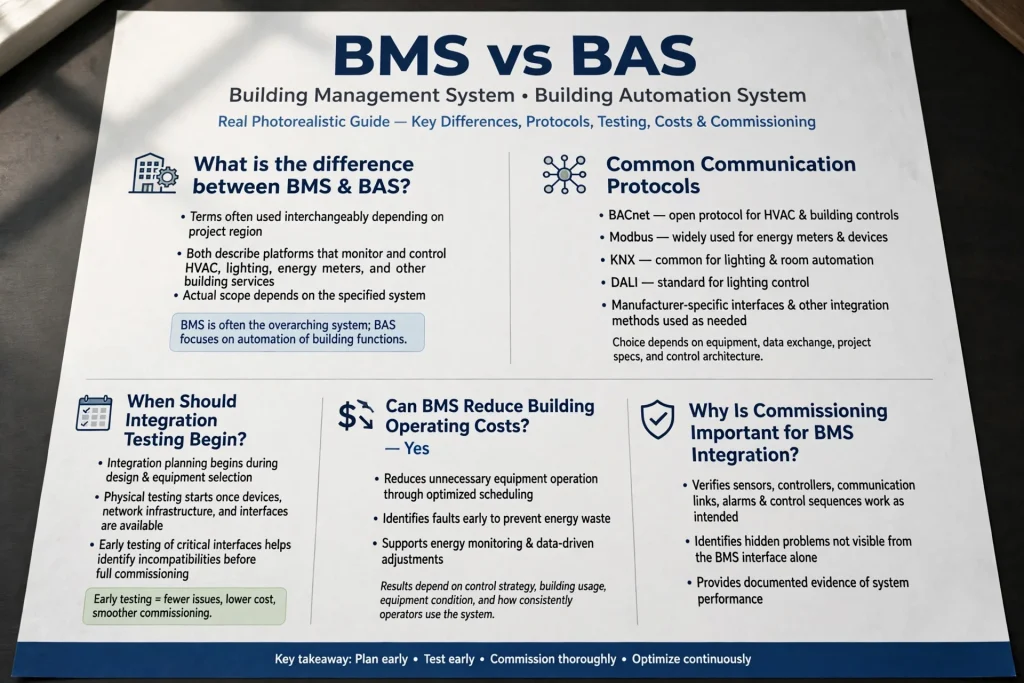
The terms building management system (BMS) and building automation system (BAS) are often used interchangeably. Depending on the project and region, they may describe platforms that monitor and control HVAC, lighting, energy meters, and other building services. The actual scope depends on the specified system.
Which communication protocols are used in building automation?
Common technologies include BACnet, Modbus, KNX, and DALI, along with manufacturer-specific interfaces and other integration methods. The appropriate option depends on the equipment, required data exchange, project specifications, and control architecture.
When should building automation integration testing begin?
Integration planning should begin during design and equipment selection. Physical testing starts when the relevant devices, network infrastructure, and interfaces are available. Early testing of critical interfaces helps identify incompatibilities before the entire project reaches commissioning.
Can a BMS reduce building operating costs?
Yes, a properly configured and maintained BMS can help reduce unnecessary equipment operation, improve scheduling, identify faults, and support energy monitoring. Results depend on the control strategy, building usage, equipment condition, and how consistently operators use the system.
Why is commissioning important for BMS integration?
Commissioning verifies that sensors, controllers, communication links, alarms, and control sequences perform as intended. It helps identify problems that may not be visible from the BMS interface alone and provides documented evidence of system performance.
Conclusion
Building automation integration failures are rarely caused by a single technical issue. They often result from a combination of unclear requirements, incompatible equipment, poor coordination, incorrect configuration, inadequate commissioning, and incomplete handover.
For projects in Dubai and across the UAE, the most effective approach is to define the integration scope early, confirm protocol compatibility, coordinate all equipment interfaces, test real operating sequences, and provide complete documentation.
A successful building automation project should do more than connect devices to a central screen. It should deliver accurate information, reliable control, safe operation, manageable maintenance, and measurable improvements in building performance throughout the property’s operational life.